
Notice processing
on autopilot
ClerqLegal reads each USCIS and EOIR notice, matches it to the client, puts the deadline on your calendar, and drafts the client email; your team reviews it before anything sends.
Immigration notices eat a full day of your team's week. ClerqLegal turns that into 10 minutes of review, so the rest of the day goes to casework that actually needs a lawyer.
Built for how immigration firms actually work
Not a generic tool with an immigration add-on. ClerqLegal was built inside an immigration practice and every feature exists because a real firm needed it.
Reads notices the way your team does, just faster
Upload a USCIS or EOIR notice and ClerqLegal extracts receipt numbers, statuses, deadlines, and hearing dates. Each notice takes seconds instead of minutes.
Deadlines show up where they should
Hearing dates, filing deadlines, and response windows get pushed directly to your calendar and case management system so no one has to remember to add them.
Clients stay informed without the back-and-forth
ClerqLegal drafts every client update in your firm's templates and tone. Your team reviews and then sends, keeping each approval in the
hands of your own people.
Built for immigration notices, not generic PDFs
ClerqLegal understands immigration form types natively. It knows what a receipt notice is, what follow-up an NTA triggers, and what your team needs next.
Pulls case updates directly from USCIS and EOIR
ClerqLegal connects to USCIS and EOIR systems to pull case updates and hearing information directly into your workflow. No more checking portals manually.
Know where your caseload stands without asking anyone
Track notice volume, processing speed, and team throughput from one dashboard. See what's moving, what's stuck, and what needs attention.
The complete toolkit
The grunt work, handled, so your team's time goes back to actual casework.
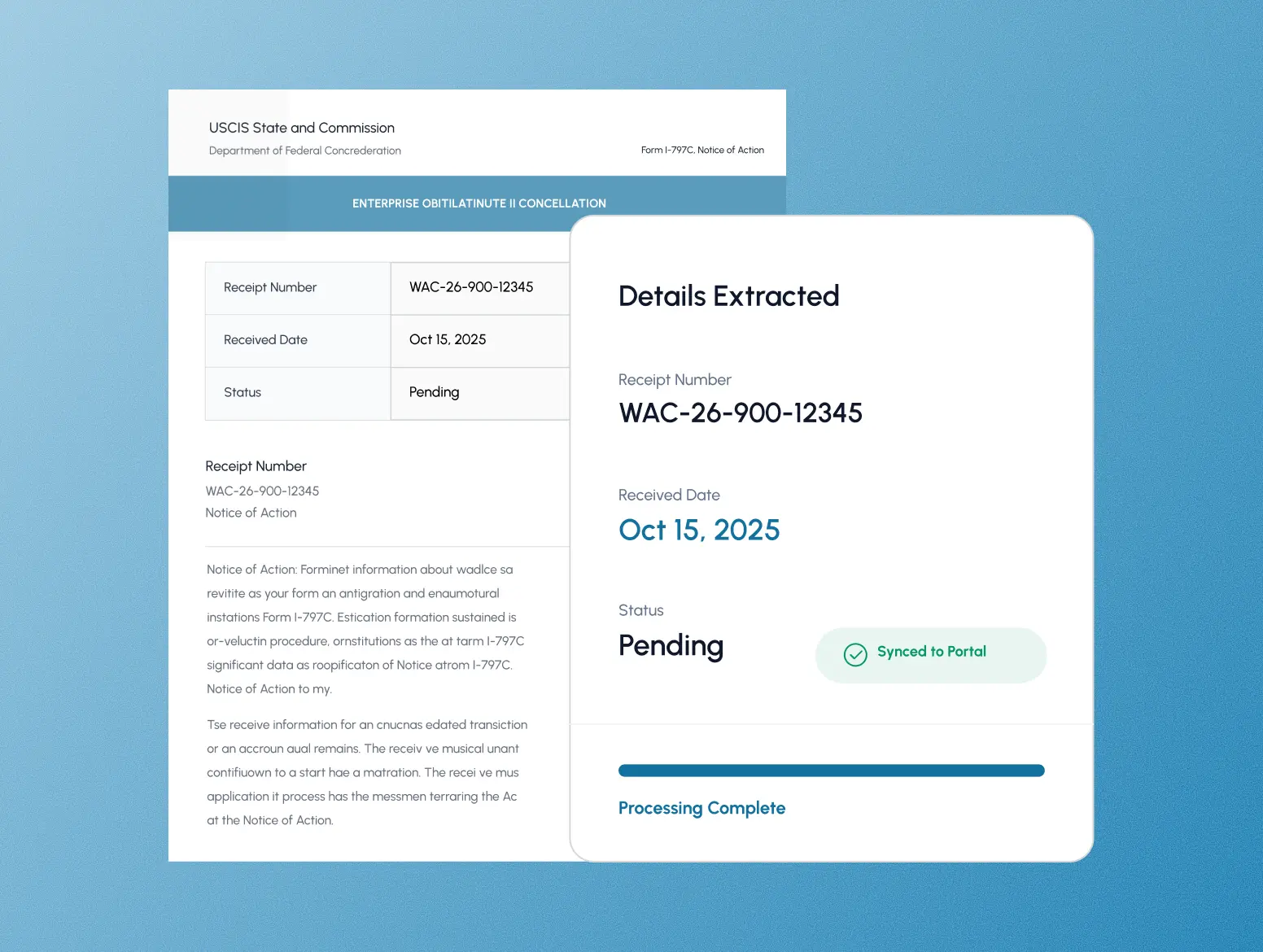
Notice details, extracted
Turn hours of data entry into seconds. ClerqLegal extracts details from receipts and syncs them directly to your practice platform, visualizing your entire caseload so you never miss a critical deadline.
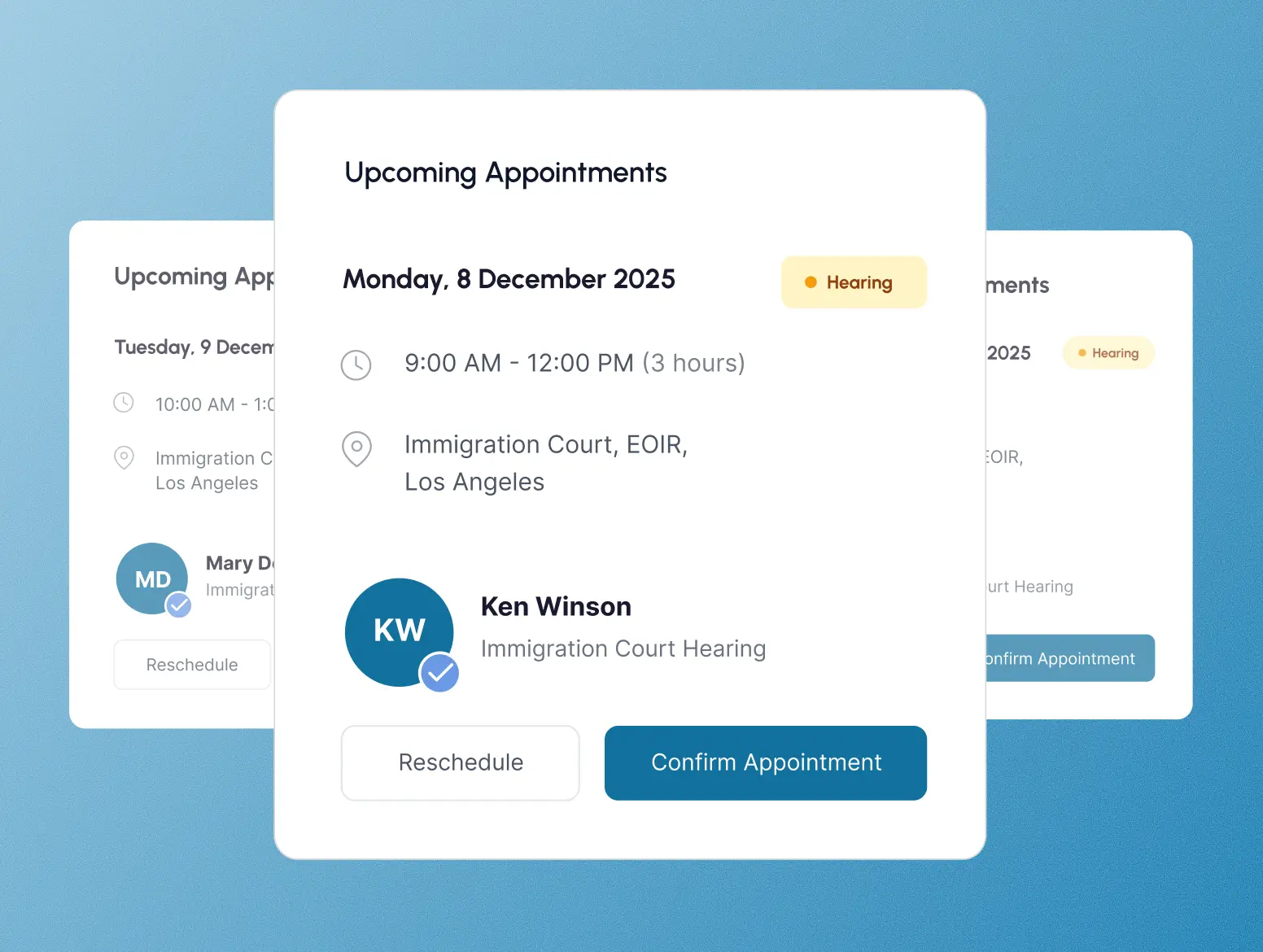
Client updates, drafted
Keep clients in the loop without the extra work. ClerqLegal drafts each client update the moment a notice arrives, in your firm's templates and tone, so your team reviews and sends without writing from scratch.
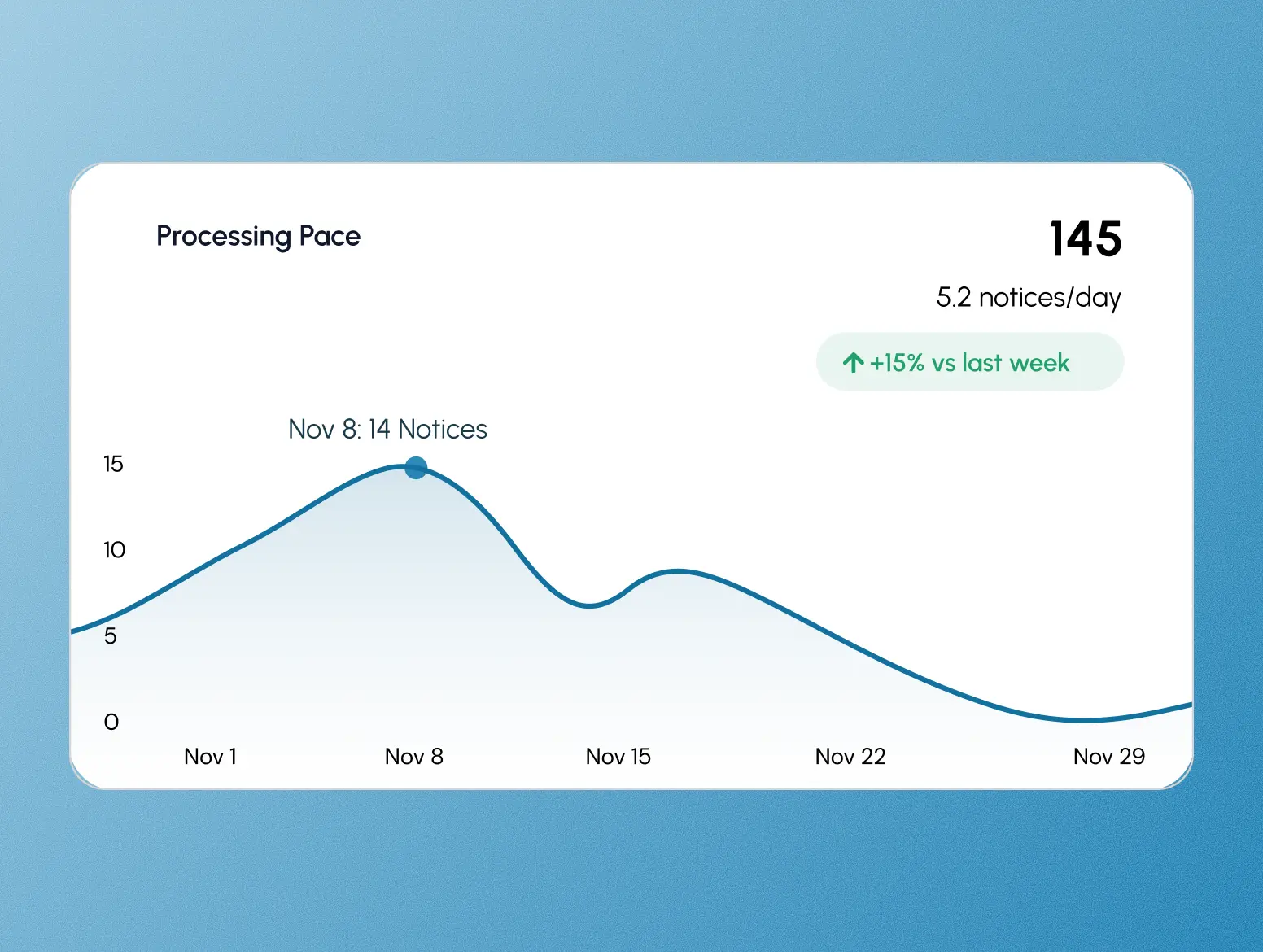
Every notice, tracked
Measure your firm's processing volume. ClerqLegal tracks notices processed over time, giving you the data needed to analyze performance, spot bottlenecks, and improve the efficiency of your practice.
Set up in a few days
We handle setup
You don't have to configure it yourself. Our team connects your case system, sets up your calendar rules, and trains your staff. Most firms are live within a week.
You see everything
One dashboard showing notice volume, processing speed, and team output. Problems surface before they become emergencies.
Your tools stay in place
ClerqLegal doesn't replace your case management system, calendar, or email. It connects to what you already use.
It works like your firm works
ClerqLegal gets configured around your workflows, your templates, and your case categories. Your rules decide how notices are processed, how clients are notified, and how deadlines are tracked.
Pricing that fits your firm
Flexible options for solo practitioners and law firms of every size: small, mid-size, or enterprise level.
Growth plan includes
- $1 per additional notice
- 1 custom integration & 10 hrs customization
- One-time setup fee waived
- Discount for annual contract
USCIS integration
Automatic retrieval and processing of all new notices from your USCIS account.
- Automated Receipt Processing
- No Setup Fee
EOIR integration
Manage ECAS hearing notices, calendars, and scheduling orders.
- Direct EOIR Case Status Tracking
- Court Date & Calendar Syncing
- No Setup Fee Required
AI assistant
An in-app AI assistant to speed up notice review and client drafts.
- In-app AI assistant
- No Setup Fee
USCIS + EOIR bundle
Get both integrations together and save versus adding them separately.
Save $49/month vs. buying separatelyEnterprise plan
Custom implementation & integrations for firms with 6+ attorneys.
- 6+ Attorneys
- 1,750+ notices / month
- Dedicated Account Manager
- Advanced Security & Controls





All product names, logos, and brands are property of their respective owners. Use of these names, logos, and brands does not imply endorsement, affiliation, or sponsorship. ClerqLegal is not affiliated with, endorsed by, or sponsored by U.S. Citizenship and Immigration Services or any other government agency.
Questions? We've got answers
Yes. ClerqLegal integrates with Clio, Filevine, MyCase, CampLegal, and Docketwise. If you're using something else, we'll work with you to find the right setup.
Most firms are fully operational within a week. Our team handles setup, integration, and training. You don't need to figure anything out on your own.
Yes. ClerqLegal was built inside an immigration practice. It understands USCIS and EOIR notice types, form categories, and the workflows immigration firms actually use. It knows what a receipt notice is and what follow-up an NTA triggers.
Yes. When a notice is processed, ClerqLegal can draft and send client updates using your firm's templates and tone. You control what goes out and when. Your team reviews when needed, or approved workflows run on their own.
ClerqLegal reads notice #3,000 the same way it read notice #10, so accuracy holds as your volume grows. When a notice doesn't match a case cleanly, ClerqLegal flags it for your team instead of guessing, and nothing reaches a client without human review.
No. If your team can upload a document and check email, they can use Clerq. Integration setup, configuration, and ongoing support are all handled by us.
Client data is encrypted in transit and at rest, and access is limited by role. We're happy to walk through our security practices and data handling during a demo.
Direct support from people who understand immigration law operations. We handle setup, troubleshooting, and ongoing optimization.
Yes. ClerqLegal is configured around how your firm works: your calendar rules, your email templates, your case categories. New York firms get different calendar logic than San Francisco firms, and the client emails sound like your firm.
No. ClerqLegal takes the grunt work off their plate, the logging, calendaring, and first-draft client emails, so your paralegals spend the day on the casework that actually needs a person. It gives your team their time back, it does not take their jobs.
See if ClerqLegal is the right fit
Pick a time and we'll walk you through how it works.